A Product Service Code is the standardized federal code that identifies what a contract action purchases, recorded in FPDS for each reported action. If that's all it does, why can a clean PSC search still miss competitors, understate a market, and make demand appear to grow or shrink when nothing in the buying office changed?
The answer sits in two facts most lookups skip. A PSC is a one-code summary of a purchase that may include several things, and the code list itself changes over time. Once you understand both, Product Service Codes become reliable for research. Without them, the same codes can distort your conclusions.
Reading a Product Service Code at a Glance
Read the first character first. A Product Service Code is a four-character value, and that first position tells you the broad type. A digit means a product, the letter A means research and development, and any other letter from B to Z means a service.
That rule lets you classify a code on sight. You don't yet know the exact purchase, but you know whether the government bought a thing, funded research, or paid for work to be performed.
How Products and Services Are Grouped
Products are organized into two-digit product groups. The first two digits place the item in a family, so group 70 covers information technology and ADP equipment. Services work differently. They're organized into letter families, where the opening letter signals a broad kind of work and the remaining characters narrow it.
| Code type | First position | Example | What it covers |
|---|---|---|---|
| Products | Digit | 70-series code | Information technology and ADP equipment |
| Research and development | Letter A | A-series code | Research and development acquisitions |
| Services | Letter B to Z | J-series code | Services grouped by letter family, such as maintenance and repair |
Keep the full four-character value in every record you save. Truncating a code to its first character merges purchases that federal reporting treats as different. A family total is useful for a first pass, but it can't replace the specific code when you're qualifying an opportunity, comparing vendors, or checking whether two awards really bought the same thing.
A One-Minute Check for Any Code
Use three steps before you rely on a code in analysis:
- Read the first character: Decide whether you're looking at a product, research and development, or a service.
- Match the family or group: Place the code in its letter family or two-digit product group so you have context even before you find the exact description.
- Confirm the current description: Check the wording in the official manual, because a familiar code may have been revised or retired.
After that check, you can classify any code you see in FPDS or a solicitation at the category level and know when you need more detail. If the first character and family look right but the specific description doesn't fit the purchase in front of you, don't force it. That mismatch is a signal to read the solicitation text and line items, not to trust the label.
Service Family Lookup for Common Codes
Read each row the same way: the letter is the first character of the code, the family is the category it belongs to, and the typical purchase shows the kind of buying you'll usually find under it.
| Letter | Family | Typical purchase |
|---|---|---|
| A | Research and development | Basic and applied research studies |
| B | Special studies and analysis | Management and policy studies |
| C | Architect and engineering | Facility design and engineering support |
| D | IT and telecom | Teleprocessing, timeshare and cloud computing |
| J | Maintenance, repair and rebuilding | Equipment repair and rebuilding services |
| Q | Medical services | Health care provision |
| R | Professional and administrative support | Records management and management consulting |
| U | Education and training | Training courses and instruction |
| Y | Construction of structures | Building and facility construction |
Think of the family as a sorting shelf, not a final answer. A D code tells you the purchase sits in IT and telecom, but it doesn't tell you whether the work is cloud hosting, network support, or something else entirely. You still need the full code and its description to make that call.
Product Groups Readers Search Most
Products don't use letters, so they're looked up by group number instead. Four groups come up often:
- Group 70: IT and ADP equipment, the product counterpart many buyers pair with D-family services
- Group 58: Communications equipment
- Group 65: Medical equipment, which often appears near Q-family medical services without being the same purchase
- Group 84: Clothing
That product and service pairing is where readers often get confused. Buying medical equipment isn't the same as buying medical services, even when both support the same hospital. The first character settles which side of that line a code falls on.
Where the Complete List Lives
The table here is a subset for quick reference. The official PSC Manual is the authority for every family, every product group, and the full taxonomy. FPDS and USAspending show the code as it was recorded on an individual award, which is useful evidence about that award but not a definition source.
Check a code against the current manual edition before you use it in any report. If a family or group you need isn't listed here, look it up there rather than guessing from a similar letter. And when the purchase description in a solicitation and the code's family seem to disagree, don't pick a winner yet. Apply the mixed-scope rule first, because a code can be correct for the largest part of an award and still hide the part you care about.
Practical rule: Use the letter or group to get oriented in seconds, then use the full code and its manual description to decide.
What PSCs Classify and How They Differ From NAICS
PSCs classify what the government bought, while NAICS codes describe the industry of the contractor doing the work. That single difference explains most of the confusion between the two systems.
The official PSC Manual states that Product Service Codes cover three broad types of federal acquisitions, products, services, and research and development, and they're recorded in the Federal Procurement Data System (FPDS) for each reported contract action. Because the code describes the purchased item or service, it's useful for analyzing demand by acquisition type, comparing spending across agencies, and identifying the purchasing history of a specific category.
| Dimension | Product Service Code | NAICS code |
|---|---|---|
| What it classifies | The government's purchase | The contractor's industry |
| Where it appears | Contract actions reported to FPDS | Industry assignments in registrations and market data |
| Best analytical use | Demand by acquisition type and agency | Industry size, growth and competitor base |
Why the Distinction Changes Your Research
Say an agency buys records management support from a company that's registered under a broader administrative services industry. The PSC tells you records management is what was purchased. The NAICS code tells you what kind of business performed it. If you search only by NAICS, you'll pull in firms from that industry that never sold records management. If you search only by PSC, you'll see the demand clearly but learn little about the structure of the industry supplying it.
That's why the two systems support different questions. PSC analysis shows demand, which agencies buy a category, how their spending compares, and what the purchasing history looks like over time. NAICS analysis shows industry composition, how large an industry is, and which kinds of firms operate in it. When you're working through an example like the NAICS 238990 classification for specialty trade contractors, you're answering a who question, not a what question.
Use the PSC to ask what is being bought. Use NAICS to ask who performs the work. Then combine both when you qualify a specific opportunity, because a strong match usually means the purchase fits your capability and the industry assignment fits your business. If one matches and the other doesn't, that gap is worth investigating before you spend capture time, since it often points to a bundled requirement or a requirement described from the buyer's angle rather than yours.
Classifying Mixed-Scope Awards Correctly
Most readers assume a PSC describes everything in a purchase. It doesn't, and that assumption is where PSC-based research goes wrong.
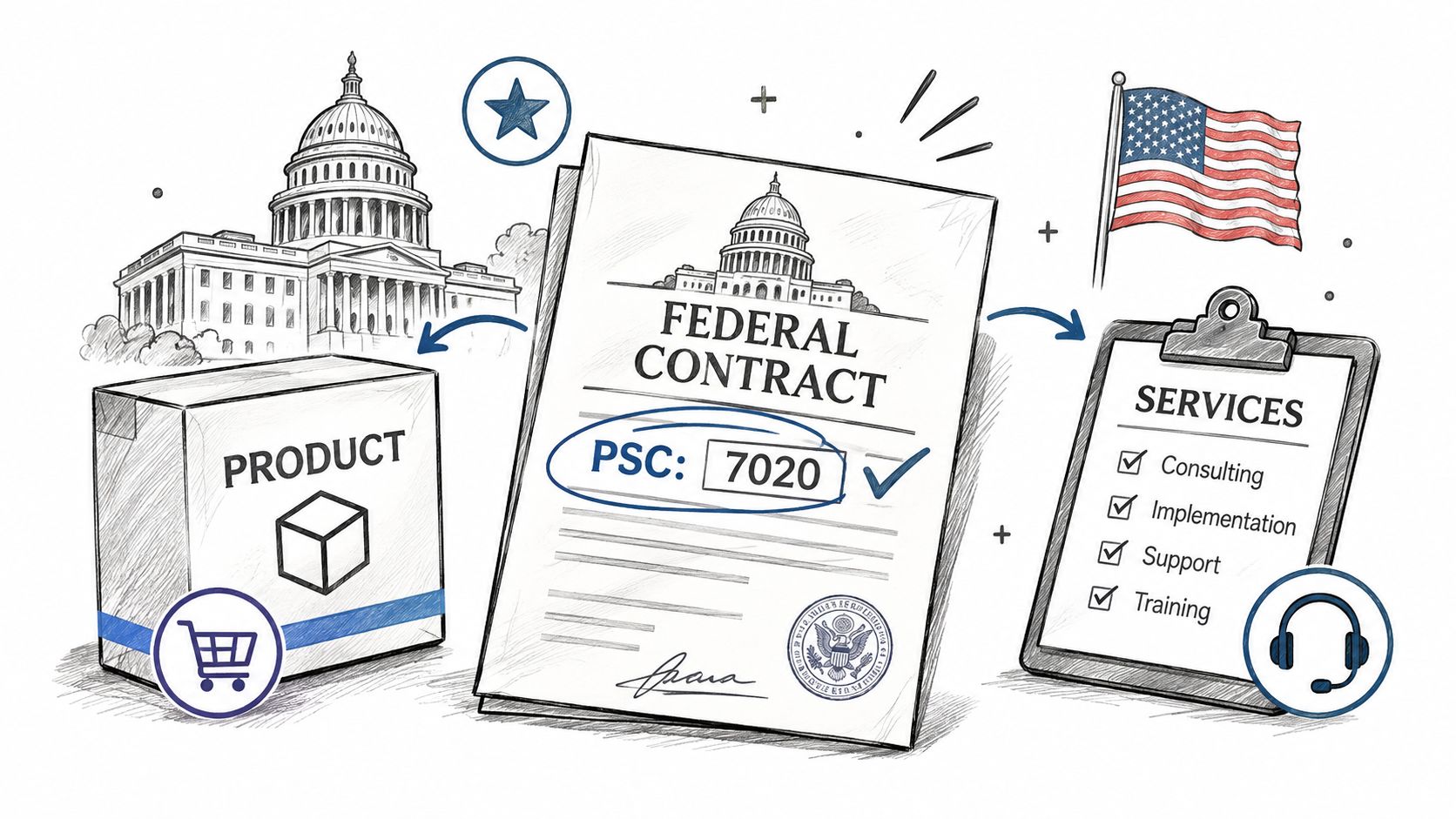
Federal reporting generally assigns one PSC to each contract action, and when multiple products or services are included, the code should represent the activity accounting for the predominant dollar amount, as described in the GAO report on contracting data. That same reporting logic underlies the Federal Supply Schedule rule, where the reported code should reflect the largest share of ultimate contract value when more than one code could apply.
A Worked Example
Say an agency awards $2.4 million for IT hardware, and the award includes $300,000 of installation services. The hardware is the predominant purchase, so the action is coded to the hardware. A services-only PSC search won't surface that installation demand at all, even though real installation work was bought and paid for.
Now scale that up. Across many awards, market sizing built on PSCs alone systematically understates secondary capabilities. Bundled requirements disappear into the dominant category. Competitors whose work is recorded under a different dominant code get misidentified or missed. A small business that's fully capable of performing the secondary work can look absent from a market it serves because its portion was never the award's predominant purchase.
Separate Primary Demand From Embedded Demand
A better research method keeps two piles instead of one:
- Primary PSC demand: Work where your category is the predominant purchase and the code represents it directly
- Embedded or adjacent demand: Work that rides inside awards coded to something else, where your capability is present but not dominant
Flag the mixed awards rather than discarding them. Read the solicitation line items, which is why understanding how contract line items structure a purchase matters here, and check NAICS, place of performance, and award-level details together. Those fields often reveal the secondary work the PSC can't show.
A PSC is a one-code summary of a potentially complex purchase, not a complete inventory of everything the government bought.
There's a clear threshold for when PSC evidence stops being enough. When the code and the solicitation text point in different directions, or when the line items show your work bundled under another category, the solicitation text must decide your qualification call. Note the difference in your records so the next person on your team doesn't repeat the same search and draw the same wrong conclusion.
Tracking Code Changes Across Fiscal Years
Codes change on specific dates, not just at fiscal year boundaries, and the order of those changes matters for anyone comparing years.
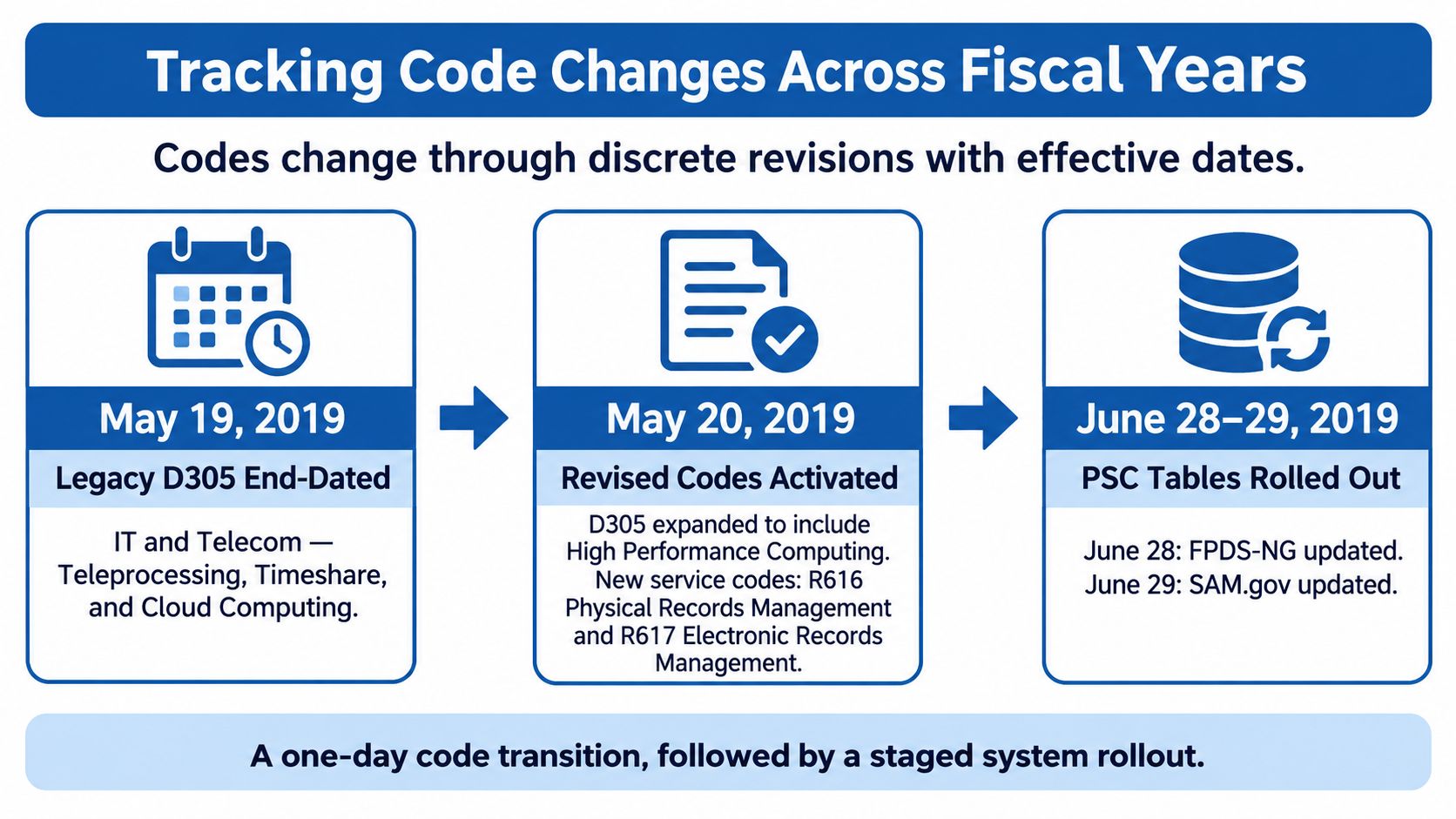
In 2019, the government end-dated PSC D305, "IT and Telecom – Teleprocessing, Timeshare, and Cloud Computing," on May 19, and the next day, May 20, 2019, it activated R616 for physical records management services and R617 for electronic records management services, according to the FY2025 PSC Manual. That manual also records updates associated with FPDS Version 1.5 Service Pack 21 and includes environmentally preferable procurement changes made on April 19, 2025.
Why a Date Can Look Like a Market Shift
Follow the logic of the 2019 sequence. Before May 19, spending could be recorded under D305. After that date, it couldn't, because the code was end-dated. A chart of D305 spending would show a drop to zero. That's not demand collapsing. That's the label being retired.
The reverse happens with activations. R616 and R617 show no history before May 20, 2019, then begin accumulating awards. A researcher who doesn't know the activation date could read that as a brand new market appearing overnight, when the underlying records management buying may have existed under other codes. The question to ask at every sharp break is direct: did federal demand change, or did the taxonomy change?
Checks That Protect a Trend Line
Build these habits into any multi-year PSC work:
- Keep effective dates with the code: Store activation and end dates next to every code you track, not in a separate reference you have to remember to open.
- Compare only overlapping years: Draw year-over-year conclusions only where the code existed in both periods.
- Use published status data: Separate current codes from retired or superseded ones before you total anything.
FPDS also gives you a quantitative check. Its government-wide "Total Actions by PSC" report can drill down to departments and contracting agencies, displaying both the number of awards and the dollars associated with each individual PSC. If dollars fall but award counts hold steady around a revision date, suspect classification before you suspect demand.
Treat a sudden break in a code's history as a classification question first. Only after you've ruled out an activation, retirement, or revision should you call it a market movement.
How to Clean and Aggregate PSC Data
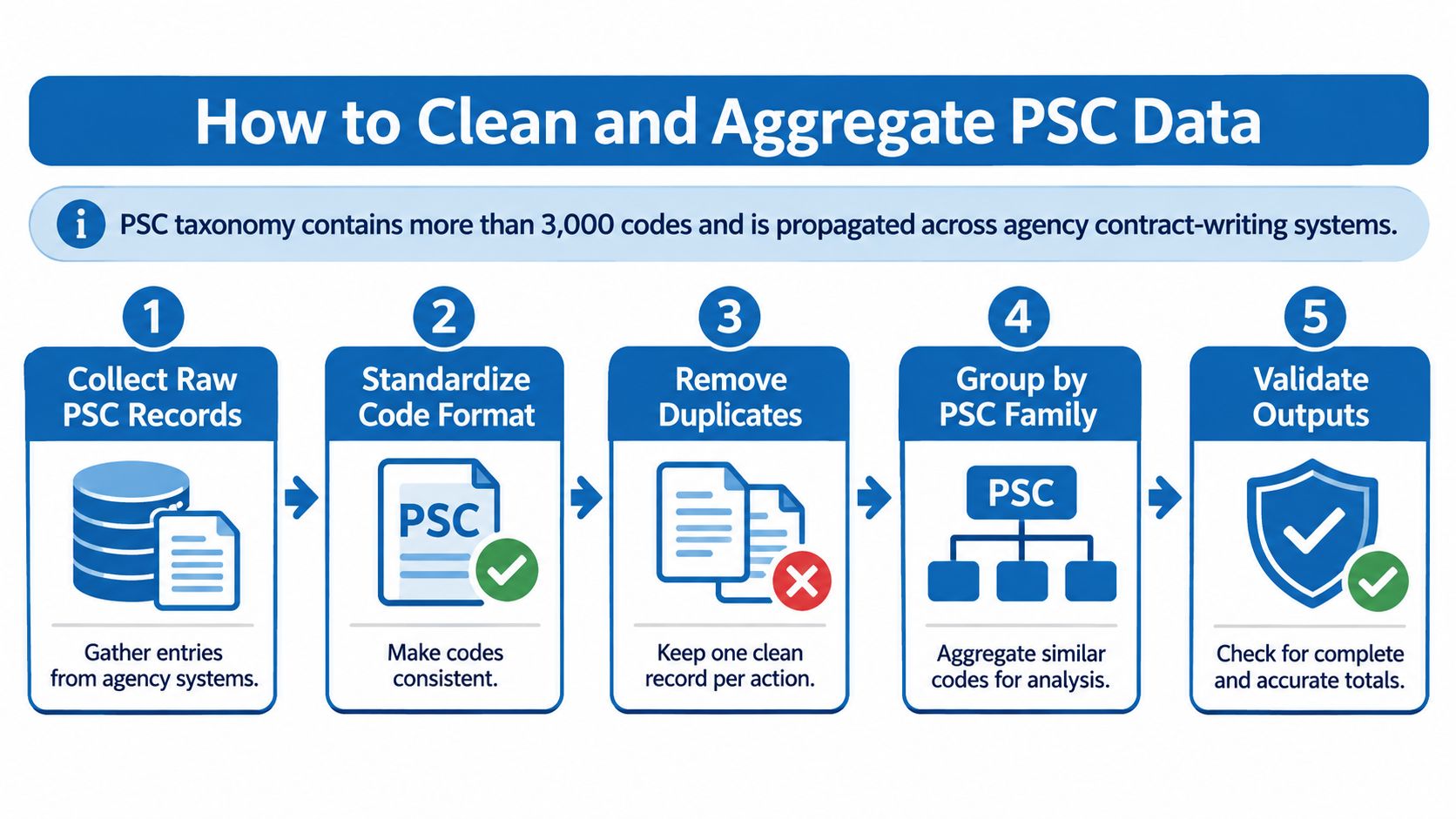
The same PSC can appear in contract-writing systems, FPDS, other Integrated Award Environment systems, USAspending, and industry data products. The taxonomy has more than 3,000 codes, according to the PSC management SOP. In USAspending, the Product_or_Service_Code field identifies the product or service procured. PSC can link records across systems, but inconsistent formatting, missing values, and code revisions can distort the totals.
Clean the data in six steps:
- Normalize capitalization and whitespace. Standardize each value before grouping. Otherwise, a lowercase entry or trailing space may be treated as a separate code.
- Validate against the official code list. Check each value against the applicable manual. Resolve codes that do not match the list before including them in analysis.
- Separate missing codes from invalid codes. A blank means no code was recorded; an invalid value means a code was recorded but does not match the list. Keep these cases separate so they can be investigated appropriately.
- Preserve the full value and its dates. Retain all four characters and the code's effective dates. A revised or retired code can make a category appear to shrink or grow even when buying patterns have not changed.
- Aggregate at two levels. Sum by the full four-character PSC, then by the family or product group. The broader total can reveal a shift across related codes, while the detailed view shows which codes drive it.
- Pair PSC with context fields. Include agency, fiscal year, set-aside type, incumbent, contract vehicle, and award type. These fields help distinguish a change in classification from a change in who bought or won the work.
A Diagnostic Worth Running Every Time
A sharp drop around a code revision may reflect recoding rather than a real decline in demand. Check the applicable manual and compare related codes before treating the change as a market trend.
For capture research, use solicitation text, NAICS, place of performance, agency, and award type alongside PSC. A code is a summary label, not a full description of technical scope. For parts suppliers, check item-level details such as part number, approved source, quantity, and requesting activity before deciding whether a requirement fits.
For automated collection from public sources, complete legal checks for research scraping before setting up the pipeline.
Using PSCs for Market and Competitor Research
Organize PSC research by the question you're trying to answer, because each question uses the code differently.
How Big Is This Category
Start with total spending by PSC across agencies and fiscal years. That view shows the size of a category and whether it's growing, flat, or shrinking. Then look at award counts alongside dollars. A category with many small awards behaves differently for a capture team than one dominated by a few large actions, even when the totals match.
Award histories by PSC also show which companies win in a category and through which contract vehicles. That's your first map of who you'd compete against. When you're comparing two categories side by side, a structured comparison guide for researchers helps you keep the criteria consistent, so you're judging both markets on spending, award count, agency spread, and vehicle access rather than on whichever number you noticed first.
When Will the Requirement Appear
PSCs describe recorded purchases, so they tell you more about the past than the future. Budget research fills that gap. We connect FY2025 to FY2027 defense budget lines to the program offices that own them and the contracting offices they buy through, years before the requirement reaches SAM.gov. Once you know which offices will buy, check which PSCs those offices have used historically for similar work. That combination lets you anticipate a requirement and predict how it will likely be coded when it arrives, instead of waiting for a notice like a typical federal business opportunity posting to tell you.
Who Competes Here and Do They Match You
Open a competitor and review their customers, contract vehicles, and teaming partners. Then test whether their PSC wins line up with your own capabilities or whether they're winning adjacent work you'd never pursue. A competitor with heavy PSC totals in your family may be winning through a vehicle you don't hold, or through teaming arrangements you'd need to replicate.
Watch for the mixed-scope trap in competitor work too. A rival who's invisible in your PSC search may be performing your kind of work inside awards coded to a larger purchase.
A Special Case for Parts Suppliers
If you monitor DLA DIBBS and Navy NECO requests, PSC-based monitoring is good for spotting historical buying patterns in a category. It isn't enough to qualify a specific request. Let the part number, approved source, quantity, and requesting activity decide, because those fields determine whether you can supply what was asked for.
Close the loop with a concrete exercise. Build a PSC-by-agency table for your target categories, track it across three fiscal years, and note any code changes that affect the comparison. Commit capture resources only after that table shows a stable pattern, not a single strong year.
Build Your PSC Watchlist Before You Pursue
A reference guide only helps if it changes a decision. Turn what you've read into a watchlist you can maintain.
Five Steps to a Working Watchlist
- List your matching codes. Use the family lookup to name every code that matches the products or services you sell. Include adjacent codes where your work might appear as embedded demand, and mark them as adjacent so you don't treat them as primary.
- Verify each code against the current manual. Confirm the description, activation date, and end date for every code on the list. Remove or replace anything retired, and note the edition you checked so the verification can be repeated later.
- Build a crosswalk across editions. When a code is renamed, reclassified, or retired, record where its spending goes next. Your goal is to separate organic spending changes from classification changes, so a revision never gets reported to leadership as market growth or decline.
- Set alerts on codes and solicitations. Watch the codes themselves and the notices that carry them. On our Free plan at $0, you get 500 searches a day, 200 record views a day, 5 AI company reads a day, 10 alerts on saved searches and notices, and saved research on every device, which covers a starter watchlist without cost.
- Record the requirement behind each code. Note the budget line or forecast that explains why the buying exists. A code tells you what was purchased, but during qualification you'll need to explain the requirement, the buyer, and the timing, not just recite four characters.
When your watchlist grows past what you can review on screen, our Pro plan includes CSV export, which makes it practical to compare codes across fiscal years offline and keep your crosswalk next to the numbers it explains.
The Decision Rule
Confirm your code set before any pursuit, not after you've already invested in a response. If a code on your list has been end-dated, or a new code now captures the work you sell, you want to learn that during research, not during capture.
When the code and the text disagree: Trust the solicitation text, then document the difference in your watchlist so the mismatch becomes institutional knowledge instead of a repeated surprise.
Keep the list short enough to maintain. A watchlist with a dozen well-verified Product Service Codes, each tied to a real buyer and a real requirement, will serve you better than a long list you never recheck. Review it whenever a new manual edition appears, because that's when the labels underneath your research are most likely to have shifted.
Build your watchlist with PSC-based filtering across awards, opportunities, budgets, and competitors, then set alerts so new notices in your codes reach you without another manual search. Start researching your target categories today at FederalPipeline and confirm your code set before your next pursuit.