Only 36 of 70 federal agencies, or 51%, confirmed completing required procurement data-quality reports for FY2023, according to GAO's procurement reporting review. That's a reason to validate your federal contract search results, not abandon them.
A useful search produces more than a list of notices. It connects a requirement to the buying office, funding context, incumbent, procurement vehicle, and your firm's ability to compete. With award searching moving from FPDS to SAM.gov, preserving that chain of evidence matters more than preserving a familiar search screen.
Pick the Right Source for Each Question
| Research question | Authoritative source | Watch for |
|---|---|---|
| Open solicitations and notices | SAM.gov contract opportunities | Check response dates and amendments before bidding |
| Past awards and recipients | SAM.gov Contract Awards search | Reporting delays can leave recent awards out |
| Planned buys before notices | Agency forecasts | Forecasts are not binding and timing often shifts |
| Defense budget requests and programs | DoD budget justification books | Shows requests, not awarded contracts |
| Legislation and policy changes | Congress.gov | Check the FY2026 NDAA section by section |
| Parts requests for quotation | DLA DIBBS and Navy NECO | Confirm quantities and approved sources |
Match the source to the decision. A forecast helps you prepare; it doesn't authorize a bid. A budget request identifies a program's proposed funding, not a contract available to your company. For bidding, work from the solicitation and its amendments.
The Treasury annual release notes describe GSA's retirement of FPDS.gov ezSearch on February 24, 2026, the move to SAM.gov Contract Awards search, and replacement of the legacy FPDS ATOM feed with the SAM.gov Contract Awards API. Move saved queries, bookmarks, and scripts deliberately, then test their outputs rather than assuming equivalent results.
During reporting delays, missing awards can reflect incomplete or outdated information. Investigate timing before declaring a market gap.
When evaluating supporting commercial tools, SignalVan's sales database comparison provides a separate reference for comparing database options; it doesn't replace official procurement records. Name the authoritative source for every question in your search log.
How to Run a Search That Catches Every Notice
No search guarantees complete coverage. Use overlapping searches so a missing classification or unfamiliar description doesn't eliminate a relevant notice.
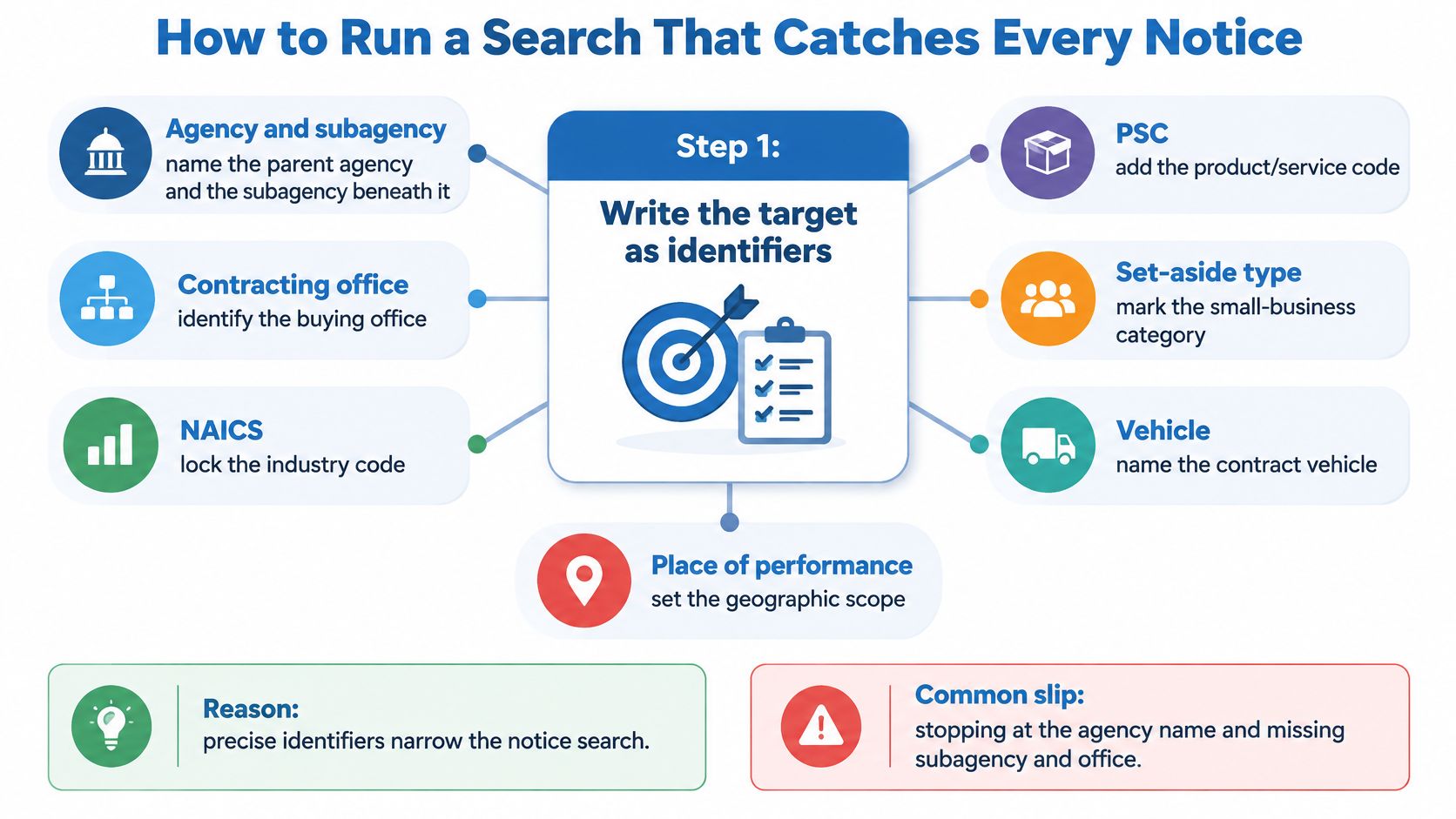
Write the target as identifiers. Specify agency, subagency, contracting office, North American Industry Classification System (NAICS), Product Service Code (PSC), set-aside type, vehicle, place of performance, and known incumbent. Pair descriptive keywords with classifications, using this guide to product and service codes to distinguish what the government buys from the supplier's industry; stopping at an agency name or a single keyword misses useful variations.
Start with a broad description, then test individual keywords and filters separately before combining the strongest ones. Log the result count for each query so you can see which restriction removes relevant notices. The common slip is overfiltering: a notice without a populated classification field disappears even when its attachment describes exactly what you sell.
Search agency forecasts and relevant grant or innovation programs separately. These can identify emerging needs before a conventional solicitation appears, but they aren't interchangeable acquisition channels. Record the program owner and anticipated route to participation instead of treating every result as an invitation to submit a contract proposal.
Inspect budget justification lines for the programs behind your target, including the program office and the work the request describes. Follow the connection from program to requirement to likely buying office, keeping requested funding separate from enacted funding and awards. The mistake is searching only your product name when the buyer describes the requirement through a system or mission.
Search past awards for buying behavior. Use the incumbent, office, requirement description, and contract vehicle to locate recurring purchases, then retain the award identifiers and the amount field's label. Don't assume the incumbent's public-facing brand is the recipient's legal name, or that an award's headline amount represents immediately available work.
Save the queries that produce useful results and enable alerts for distinct search purposes, such as a requirement family or buying office. Keep a broad discovery query alongside narrower pursuit queries. Saving only your most restrictive query makes the alert stream tidy but leaves you vulnerable to differently coded notices.
Keep a reproducible query log. Record the search date, source, search terms, filters, result count, sort order, and export filename where applicable. When a later run changes, inspect the affected records before changing your market estimate; otherwise, a new notice, revised record, or delayed report can look like an unexplained increase in demand.
Validate Records Before You Trust Them
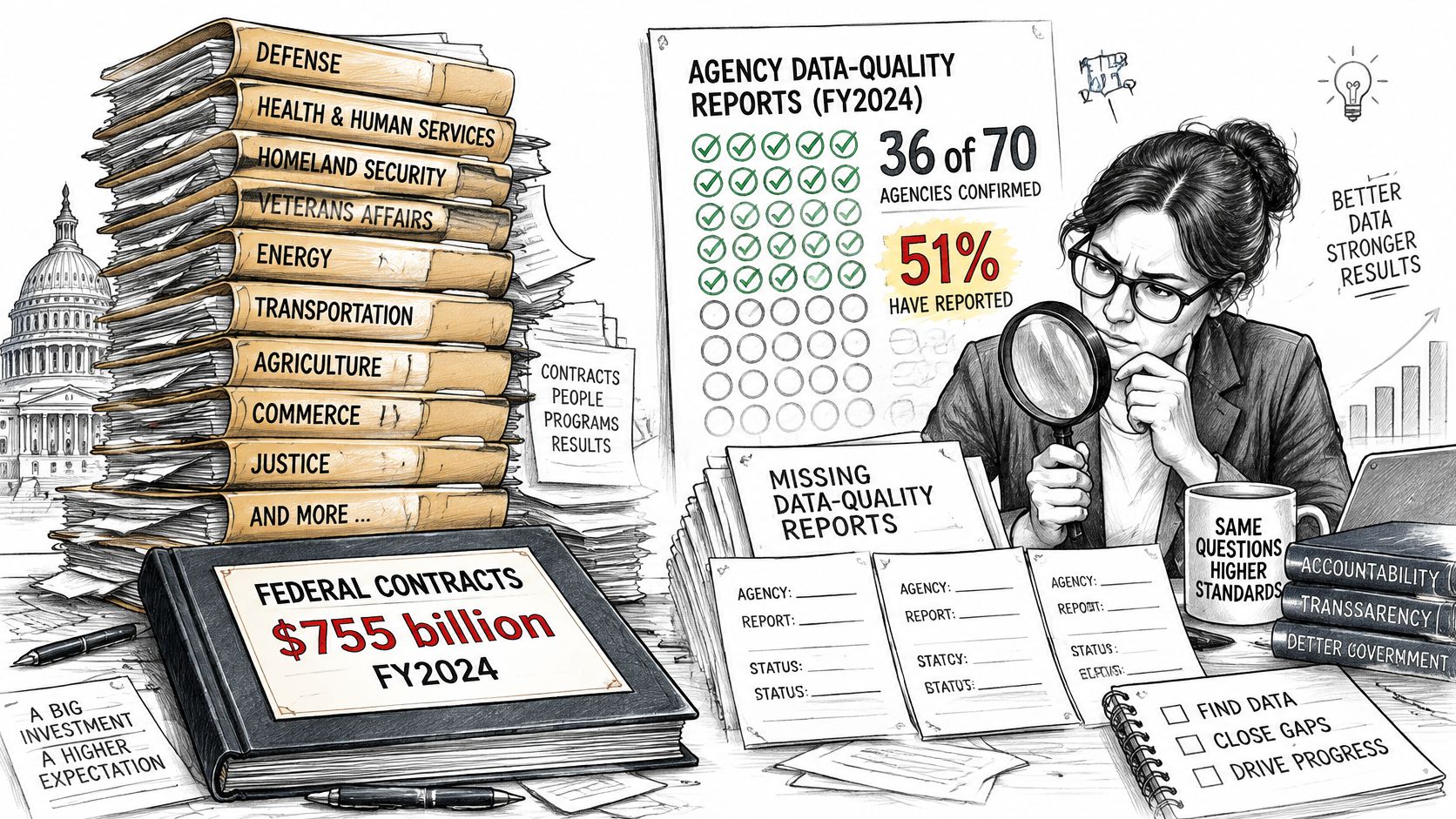
Federal agencies recorded approximately $755 billion in FY2024 procurement obligations, while 19 of 24 agencies reviewed missed the applicable procurement-data-quality reporting deadline, according to GAO's procurement data-quality report. The scale makes award research valuable. The reporting weaknesses make unexamined exports risky.
Treat each award record as evidence, not ground truth. Before using it, establish who received the award, which action the record represents, and what its financial fields measure.
Set an evidence standard
I recommend a two-source minimum for market sizing: the primary notice or award record plus an agency or budget document. For a capture-critical figure, add an independent corroborating record, such as a corresponding spending record or agency award announcement.
These are research benchmarks, not government reporting requirements. Separate websites aren't necessarily independent evidence if both reproduce the same underlying feed.
Normalize the recipient's legal name and unique identifier against its SAM registration. Preserve the original name alongside the normalized version so someone else can audit the match.
Then separate obligations from ceiling values. A ceiling represents potential contract capacity, not money already committed or demand your company can necessarily contest. Inspect modifications, options, and task orders before assigning a pursuit value.
Send exceptions to manual review
| Red flag | What to check | Action |
|---|---|---|
| Missing dates | Award date and period of performance in the source record | Send to manual review |
| Inconsistent NAICS or PSC codes | Code on the notice versus code on the award | Send to manual review |
| Unusual obligation-to-ceiling ratio | Obligations divided by ceiling value | Inspect modifications before sizing demand |
| Duplicate awards | Same contract number or action appearing in more than one record | Remove duplicates before totals |
| Vendor-name variants | Legal name and unique identifier from the SAM registration | Normalize before matching |
A low obligation-to-ceiling ratio isn't automatically an error. It can reflect a vehicle with unused capacity, early performance, or funding added through later actions. The ratio tells you where to investigate, not what conclusion to enter.
Practical rule: Keep unresolved records out of decision-ready totals. Preserve them in an exception list with an owner and a specific verification task.
Say an export shows a recently dated action for facilities support. The description resembles a fresh requirement, but the contract identifier matches an existing award and the modification exercises an option. Record continued incumbent performance, not a newly competed opportunity, and investigate the remaining performance period before forecasting a recompete.
Reconcile Award Counts Across Systems
Different totals don't necessarily mean a system is wrong. One search may return award actions, while another presents contracts rolled up to an award-level total.
Modifications and option exercises can generate action records against an existing award. Task orders need particular care: they may be separate awards under a parent vehicle, so preserve both the order identifier and the parent relationship. Counting every action row as a new contract inflates the apparent number of buying decisions.
Check exports before using totals
- Capture the extraction context. Record the query date, API endpoint or export type, and every filter.
- Match the scope. Compare the export count with the screen using identical filters, checking pagination and export limits.
- Rebuild financial totals. Reconcile cumulative obligations against the relevant obligation actions, including negative adjustments. Don't sum revised ceiling snapshots.
- Inspect reporting lag. Flag records reported substantially after their action dates.
- Compare a sample. Check representative awards against USAspending records and document field or update differences.
- Repeat the extraction. Rerun the saved query after a short interval and compare record identifiers, not just the headline count.
A changed total needs an explanation before it belongs in a forecast.
Classify differences as new actions, amended records, reporting delays, or extraction issues. Keep unresolved discrepancies visible rather than forcing the totals to agree.
Check Whether You Can Actually Compete
Finding a suitable requirement doesn't establish that your company can bid it profitably. Eligibility, delivery capacity, proposal cost, and working capital are separate questions, and a strong technical match can still produce a no-go decision.
For a small business, contestable demand matters more than the entire federal market. The Congressional Research Service's small-business contracting overview reports that small businesses received $176 billion in FY2024 prime-contract awards out of $774 billion in total contract expenditures, while more than $117 billion was awarded through set-asides or competitions restricted to small businesses. Those are market-sizing benchmarks, not your probability of winning.
Apply the eligibility test before proposal work
| Stage | What to check | What to record |
|---|---|---|
| 1. Size and NAICS | Map the solicitation NAICS and size standard to your current SAM profile | Standard applied and profile date |
| 2. Set-aside rules | Confirm the category, certification, ownership, location and subcontracting limits | Certification status and expiry date |
| 3. Delivery fit | Compare place of performance and contract type with your operational capacity | Capacity notes and any gaps |
| 4. Incumbent pattern | Review the incumbent and prior-award history for the agency and office | Incumbent name and award history |
| 5. Decision | Record a dated go or no-go and re-check after each amendment | Decision, date and reason |
For the first stages, verify the solicitation's actual requirements rather than relying on a search badge. Record any certification issue as a blocker with an owner, not a vague assumption that it can be resolved before award. Use a consistent eligibility checklist so different reviewers apply the same questions.
Delivery fit includes staffing, clearances, sourcing restrictions, installation, freight, and cash needed before payment. For a shelving requirement, for example, you might compare GSA schedule storage shelving from Material Handling USA to understand the product and purchasing context, then verify the actual solicitation's vehicle access, specifications, and delivery obligations. A commercial product match alone doesn't establish eligibility.
Distinguish an incumbent advantage from a closed market
Review how the agency bought the work previously. An incumbent's operational knowledge may make a rushed direct bid unattractive, while teaming or subcontracting could offer a more realistic entry point.
Don't treat total small-business awards and restricted competitions as interchangeable success rates. Calculate qualified notices won divided by qualified notices bid, segmented by agency, NAICS, vehicle, and set-aside type. That measure reflects the pursuits your company chose to contest.
Track Pursuits and Filter Alerts Without Missing Changes
More alerts can make pursuit management worse when every notice receives the same attention. A broad inbox encourages quick reactions to newly published work while qualified pursuits sit without a next action.
Give each pursuit a name, stage, responsible owner, next action, and target date. Attach the supporting research and dated go/no-go decision to that entry, rather than scattering them across email threads and downloaded attachments.
Route alerts by decision, not arrival time
- Reject clear eligibility failures. Remove notices that fail the size or set-aside checks from the active queue, while retaining the reason.
- Hold unresolved evidence. Assign capture-critical uncertainties for corroboration before approving proposal effort.
- Watch plausible opportunities. Retain relevant notices that need buyer clarification, a teaming decision, or a better understanding of delivery requirements.
- Advance ready pursuits. Give qualified opportunities a concrete action, such as reviewing attachments, requesting a supplier quote, or preparing questions.
An alert isn't an assignment until someone owns the next step. Use a capture plan for pursuits that require coordinated buyer research, competitive positioning, and proposal preparation.
Review changes that affect the decision
A set-aside amendment can change who may compete. Revised specifications can invalidate a supplier quote, and an extended response date can make a previously impractical bid feasible. Route these changes to the pursuit owner rather than treating them as ordinary discovery alerts.
Schedule a weekly 20-minute pipeline review as a working discipline. Check approaching deadlines, overdue actions, unresolved blockers, and changes to active notices; close entries that no longer justify effort.
Review saved searches quarterly against your target identifiers. Remove obsolete office names, add useful requirement synonyms, and test whether recent relevant notices would have matched.
Aim for fewer, better-qualified pursuits, not a larger collection of notices.
Keep broad discovery separate from active bid monitoring. That preserves market visibility without asking proposal staff to qualify the same irrelevant results repeatedly.
Run Your First Qualified Search This Week
Use a short implementation cycle to build a research habit you can maintain. Start with a narrow market rather than trying to map every agency that could buy your services.
Use the calendar as a reminder to separate discovery from qualification.
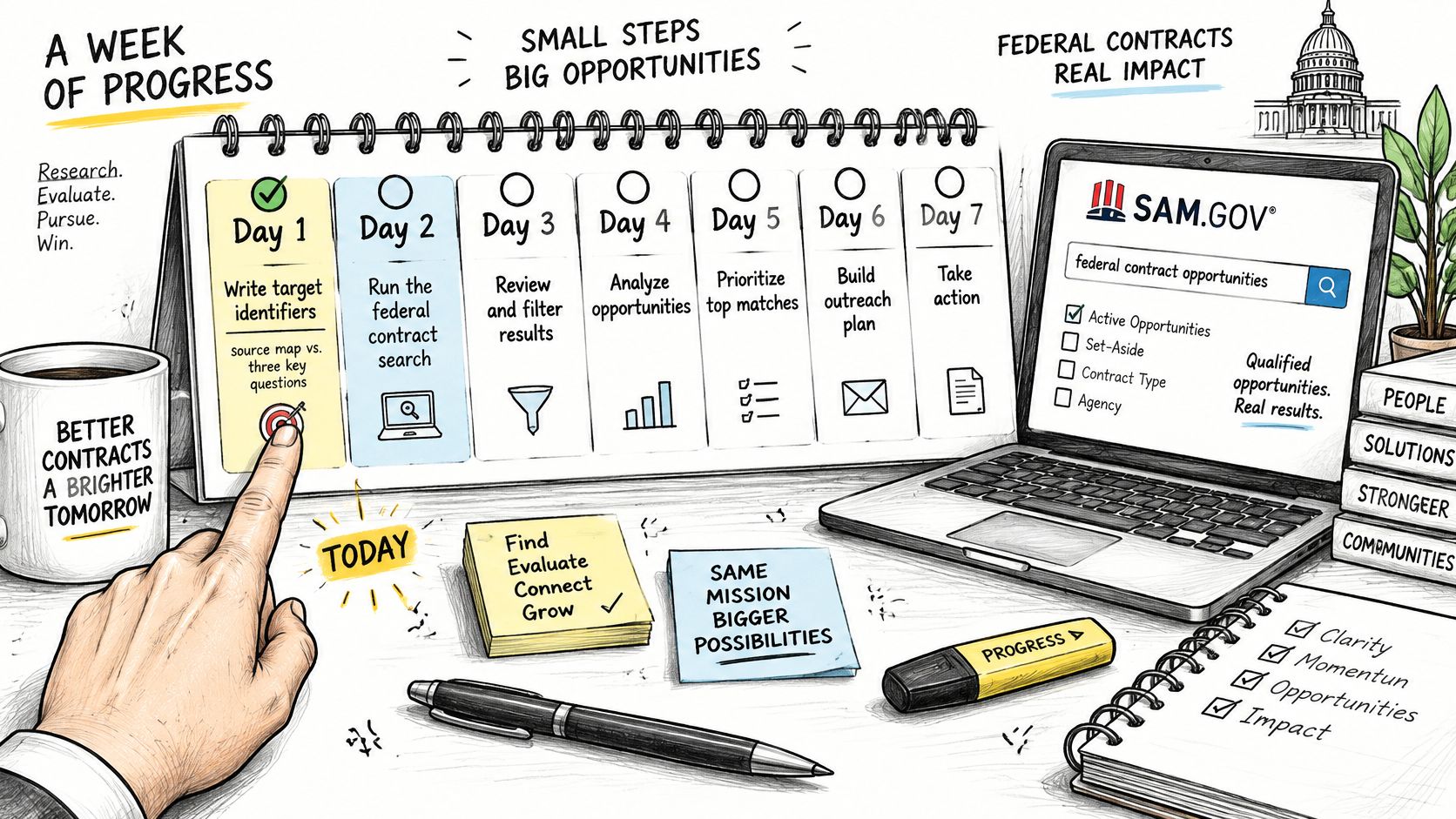
- Day 1: Write your target identifiers and assign an authoritative source to your most important research questions.
- Day 2: Run the searches and save each query with its date, filters, and result count.
- Day 3: Validate the most relevant open notices, adding corroboration for capture-critical details.
- Day 4: Complete the eligibility test and record dated go/no-go decisions.
- Day 5: Create a pipeline entry for each go decision, with a next action and target date.
- Day 6: Rerun saved queries and investigate changed records.
- Day 7: Review which searches produced useful results and schedule your recurring pipeline review.
Use the accompanying video during your working session.
FederalPipeline is one platform that combines SAM.gov solicitations, agency forecasts, and grants in a single search with a pipeline view, and the same steps work with any tool that keeps dated query records.
Our search brings together solicitations, forecasts, grants, and innovation programs, while our pipeline keeps pursuit stages, next actions, and supporting research together. Visit FederalPipeline to run a targeted federal contract search and organize the opportunities your firm can realistically pursue.