A UEI is the U.S. federal government's official 12-character alphanumeric identifier for organizations that receive or pursue federal awards, issued through SAM.gov by the General Services Administration, and it replaced the nine-digit DUNS number on April 4, 2022.
So here's the question that trips up experienced capture people as often as newcomers. Can a company hold a perfectly valid UEI and still be locked out of the solicitation sitting on its desk? Yes. Every time. And the reason comes down to a distinction most plain-English explanations of "what is a UEI" blur together: the identifier proves who you are, not what you're allowed to do.
This guide walks from the definition to the eligibility rules in order. By the end you'll know what the identifier is, how it differs from the other codes in federal records, how to get one without paying anyone, and how to tell whether the company holding it can submit an offer.
What a UEI Is and Why Federal Systems Use It
A UEI is the federal government's official 12-character alphanumeric identifier for organizations that receive or pursue federal awards. It's assigned through SAM.gov, and the General Services Administration generates it, not a private commercial data provider selling business credit reports.
The easiest way to hold it in your head is to treat it as a national registration number for a legal entity. A state gives a company an entity number when it files formation papers. The federal government gives the same company a UEI so that solicitations, registrations, awards and assistance applications all point back to one organization instead of a dozen spelling variants of its name. The characters themselves carry no meaning. A UEI looks like a random string such as A1B2C3D4E5F6, mixing letters and numbers, and its only job is to point at one legal entity.
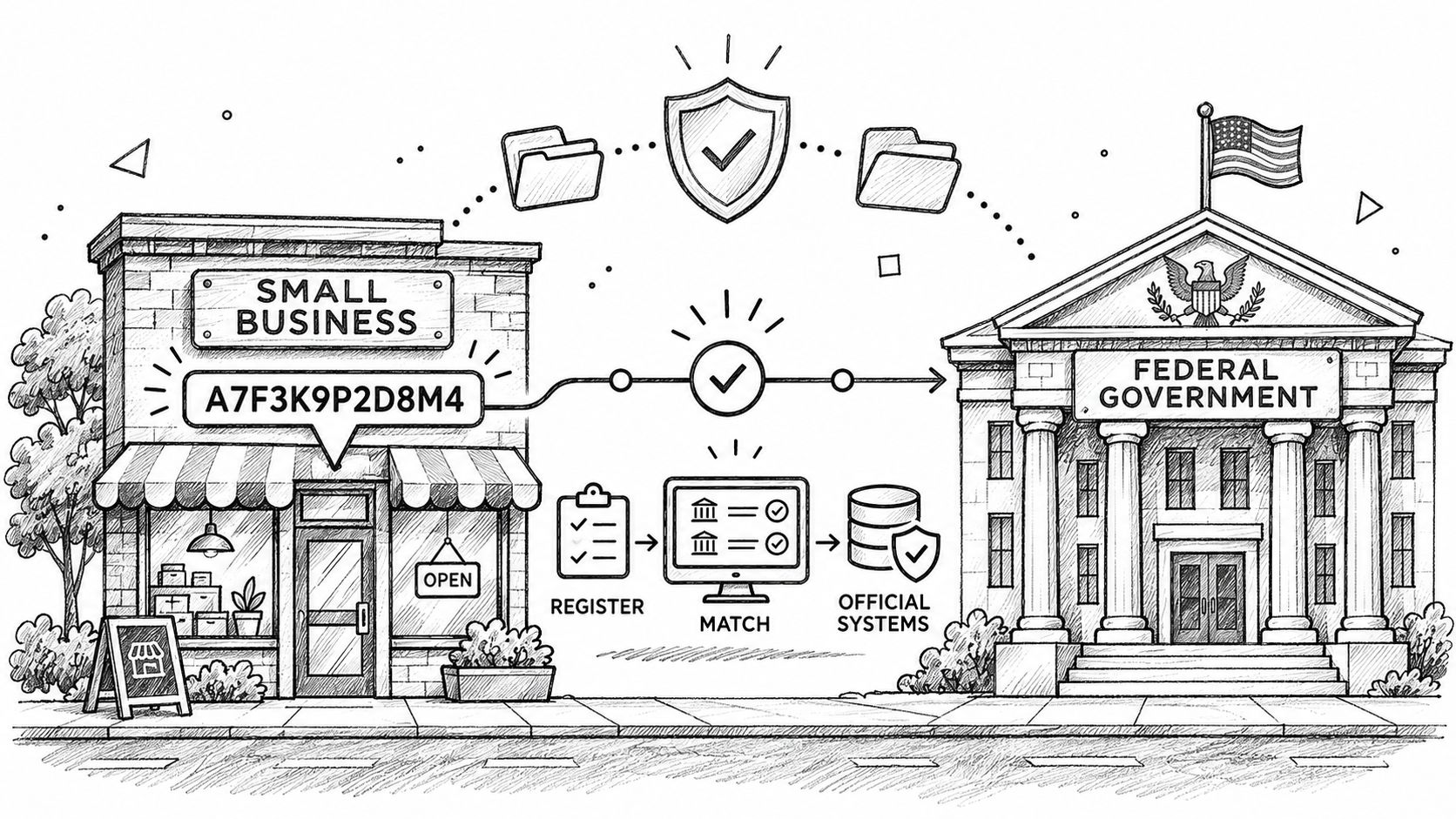
Federal buyers depend on it because procurement data is fragmented across systems that don't share a spine. A contract award lives in one place, a grant application in another, a vendor profile in a third. The UEI is the field that lets all three resolve to the same entity. The 2024 U.S. Department of State solicitation that required applicants to supply one is unremarkable language in civilian and defense notices alike.
The identifier you see in 2026 replaced something older. On April 4, 2022, the UEI became the principal entity key across solicitations, registrations and award records, retiring the nine-digit DUNS number, according to SAM.gov's transition notice. Organizations that already had a registration, including some that had expired, were generally assigned a UEI automatically during the switch.
Four groups end up with one:
- Prime contractors and product vendors bidding on federal contracts, where the UEI appears on the offer and in the award record.
- Nonprofits, universities and state or local agencies applying for federal financial assistance.
- Subcontractors whose primes need the identifier for subaward reporting, even where full registration isn't required.
- Parts suppliers answering requests for quotations, including DLA DIBBS and Navy NECO requests, where buyers want an identifier on file before they place an order.
Older documents still show DUNS numbers, so historical research turns up both formats side by side. The FederalPipeline guide to federal procurement research covers why that matters when you're stitching records together across years.
The takeaway is narrow and useful. The UEI answers "who are you," and confirming it is the first step before you evaluate any federal opportunity.
UEI, DUNS and CAGE Codes Compared
Three identifiers appear constantly in federal records, and readers mix them up more than any other detail on this topic. Put them side by side and the confusion mostly dissolves.
| Identifier | Format | Issued by | Status in 2026 |
|---|---|---|---|
| UEI | 12 characters, letters and numbers | General Services Administration through SAM.gov | Current federal entity identifier |
| DUNS number | Nine digits | Dun & Bradstreet | Replaced April 4, 2022; appears in older records |
| CAGE code | Five characters | Defense Logistics Agency, linked to SAM registration | Still used in defense supply records |
| NCAGE code | Five characters | NATO codification system for non-U.S. entities | Used alongside UEI for certain foreign entities |
The UEI is the live entity key. Two UEIs differ by 12 characters, and no two active organizations share one. If a record from 2026 shows a UEI, you're looking at the current identification scheme.
The DUNS number is retired as the federal key, but it hasn't vanished from the world. You'll find nine-digit DUNS numbers in award histories, capability statements written before 2022, teaming agreements, and subcontract templates that never got updated. A DUNS number cannot be entered into a 2026 registration, because the field expects 12 characters and a validation check against SAM.gov's entity records.
The CAGE code answers a different question entirely: which facility or commercial entity is supplying this item in the defense supply chain. Defense buyers use it on quoting and shipping paperwork, and primes ask for it when they onboard a supplier. A CAGE code does not replace a UEI, and a UEI does not replace a CAGE code. For defense work you'll typically need both.
The NCAGE code is where foreign entities meet the same machinery. Non-U.S. organizations go through NATO codification for that five-character code, and SAM's entity validation has to agree with what was submitted. A mismatch between NCAGE details and SAM's records can cause a rejection or a delay, as SAM.gov's offeror validation guidance notes, so reconcile the two before you bid rather than after.
A quick way to keep them straight: a DUNS number answers "who was this in 2019," a CAGE code answers "who supplies this part," and a UEI answers "which legal entity is this today."
The practical rule follows from that. When a record shows an old number or a name you don't recognize, don't merge it into your own data on a hunch. Look the entity up in SAM.gov first, confirm the current UEI, then attach the historical record.
How to Get a UEI Through SAM.gov
The process is shorter than many expect, and the delays almost always come from one field rather than from the government's side. Work through it in order.
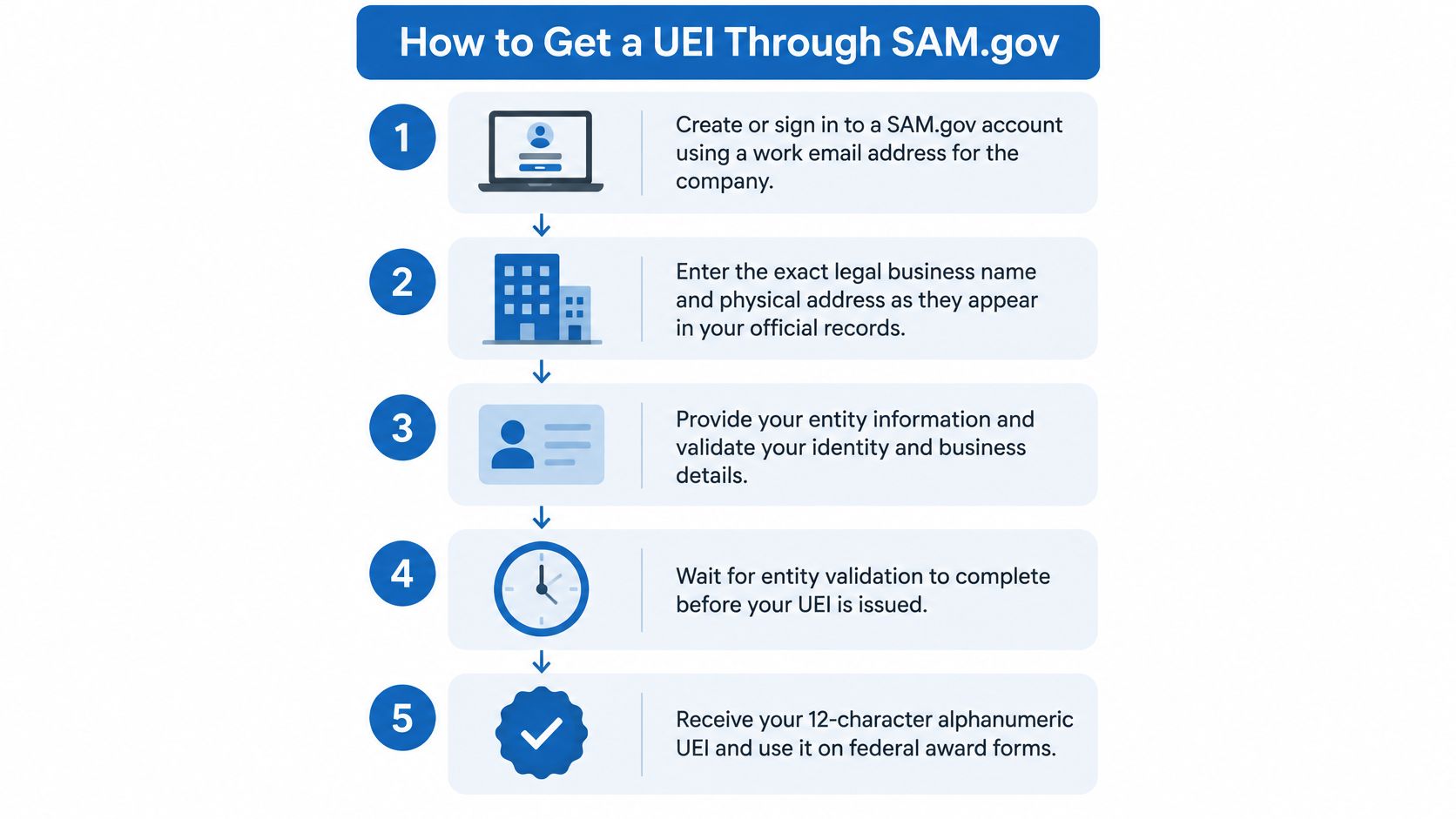
1. Create or sign in to a SAM.gov account. Use a work email address on the company's own domain, not a personal inbox or a consultant's address, because the account becomes the recovery path for everything that follows.
2. Enter the exact legal business name and physical address. This is the step that decides how long the rest takes. Government validation matches those two fields against authoritative records to confirm the entity is real and unique, so a nickname, a suite number that doesn't appear on your state filing, or a DBA in the legal name field will stall the request.
The legal name itself comes from your formation documents. If you registered the business at the state level, that filing is the record of truth, and it's worth checking the naming rules before you assume what the state issued. Attorneys at Coto & Waddington explain Florida LLC requirements for 2026 in detail if your entity was organized there or you're deciding where to form.
3. Choose your path. Requesting only a UEI suits organizations that won't apply directly for awards, such as some subaward reporting situations. Full entity registration suits organizations that intend to bid as a prime contractor or apply for federal assistance. The two are different products with different data requirements.
4. Supply the identifying details your path calls for. A UEI-only request needs core information about the entity. Full registration goes further, pulling in eligibility details, points of contact, and the representations and certifications you'll certify with each offer.
5. Wait for validation. The identifier is issued as part of the government confirming the entity exists and is unique. Nothing about this step moves faster because you call someone.
6. Record the UEI and put it where it's used. Solicitations, vendor profiles, subaward reports and award systems all want the same string. Store it with the legal name and address as a single block so the three never drift apart in your files.
In 2024, NOAA's contractor registration guidance stated plainly that entities must obtain a UEI through SAM.gov to register as contractors and be eligible for awards. That's the mechanism, and there's no side door.
The finished record has four parts, and all four need to be right: the UEI, the exact legal name, the physical address, and an active registration status. Teams that treat the identifier as the finish line usually discover the fourth part at the worst possible moment.
If you want the full picture of everything a solicitation will ask for beyond the identifier, the federal contract requirements checklist covers registrations, certifications and the documents offerors routinely miss.
SAM.gov also publishes a walkthrough of the interface itself, which helps if you'd rather watch the screens than read about them:
Finding an Existing UEI and What It Costs
The identifier is generated by the General Services Administration through SAM.gov, not by a paid commercial provider, so nobody has to pay a third party to issue one. A firm that offers to "get you a UEI" for a fee is either doing free paperwork on your behalf or creating a duplicate record you'll spend months untangling.
Before requesting anything, check whether your organization already has one. Companies frequently do, left over from an earlier award, a subaward report, or a registration that lapsed years ago.
- Search the entity in SAM.gov using the exact legal business name, not the brand name customers know.
- Confirm the match on legal name and physical address against your official records.
- Check the registration status shown on that record, since an existing UEI doesn't imply active registration.
- Record the UEI, legal name and address together in your own files and in any CRM or pipeline system you use.
That first step saves real work. Requesting a fresh identifier for an entity that already has one usually produces a second record with a slightly different name or address, and now you own a reconciliation problem across every dataset that touches both.
If a record you're working from shows a different legal name, or nothing but an old DUNS number, resolve it in SAM.gov rather than trusting the older document. In most cases the fix is an entity data update: a name change after a rebrand, a new physical address, an ownership change. Update the record that exists. Don't mint a new identifier to work around stale data.
Cost check: the government issues the identifier. Anyone charging a fee to obtain it is charging for administrative labor or for something you can do yourself in SAM.gov.
Readers who already hold a UEI but have never completed full registration should read the next section before spending an hour on a bid.
What a UEI Can and Cannot Unlock
A small fabrication shop gets a UEI because the prime contractor on a nearby installation needs it for subaward reporting. Six months later the shop finds a solicitation it can win, drafts a technical approach, and discovers at submission that the portal won't accept an offer from an entity without an active registration. The identifier was real the whole time. The eligibility was never there.
That gap is the single most expensive misunderstanding in federal market entry, and it's a data problem before it's a policy problem. Capture teams matching companies against opportunities can see a clean UEI match and conclude the company is a candidate. The match proves identity. It doesn't prove the company can submit.
| Activity | UEI only | Active SAM registration |
|---|---|---|
| Identify your legal entity in federal records | Yes | Yes |
| Report as a subawardee on a federal award | Usually yes, under subaward rules | Required when the subaward rules call for it |
| Bid directly as a prime contractor | No | Yes |
| Apply directly for federal assistance | No | Yes |
| Hold a prime award for the life of a contract | No | Yes, renewed as required |
Why identity and eligibility are separate questions
The principle is simple enough to state in one line: the UEI supports entity matching, while active registration supports direct participation. SAM.gov treats them as separate states because they answer different questions and change on different schedules.
An organization can request an identifier without completing full registration when it doesn't intend to apply directly for an award. As SAM.gov's entity registration guidance explains, that limited request needs core identifying information such as the legal business name and physical address, while full registration requires broader entity and eligibility details. The distinction exists for a reason, and it's not a loophole.
The General Services Administration's status guidance describes the UEI as the authoritative identifier for entities doing business with the federal government, while also noting that offerors generally need active SAM registration when submitting an offer, at award and throughout the contract. Both statements are true at once. That's the part people miss.
Four misconceptions worth correcting out loud
A UEI proves you're eligible to bid. It proves identity only, and eligibility lives in the registration record.
A subsidiary can bid on its parent's UEI. Separately organized affiliates may hold distinct identifiers, so a parent's UEI tells you nothing about whether the subsidiary is registered or eligible.
An old DUNS number means the company never registered. It usually means the record predates April 4, 2022. Find the current UEI in SAM.gov before drawing conclusions.
Once you have a UEI, it needs no further attention. Name changes, address changes and renewal lapses all affect the registration sitting behind that permanent identifier.
Candid note: most "what is a UEI" content stops at the acronym and the DUNS replacement. The operational risk isn't in the acronym. It's in treating an identity milestone as a compliance milestone.
The order to check before you spend bid time
Work in sequence. Each step depends on the one before it, and skipping ahead wastes the effort.
- Confirm the UEI belongs to the bidding legal entity. Check the exact legal name, not the trade name on the website.
- Verify that registration is active, and that it stays active through the solicitation due date.
- Review solicitation-specific requirements, including representations and certifications, socioeconomic certifications for set-aside eligibility, and any technical qualification the notice demands.
A matching UEI is the starting gun, not the finish line. Treat it as the key that opens the record, then read what's inside.
Renewal, Status Checks and Your Pre-Bid Check
Two clocks run at the same time here, and confusing them is how companies lose awards they were qualified to win. The UEI does not expire. It stays attached to the organization permanently. The SAM.gov registration does expire, and SAM.gov's registration guidance says registrations must be renewed every 365 days to remain active.
Federal guidance goes further, holding that offerors generally must maintain active registration through offer submission, at award, and for the life of the contract. Permanence improves entity continuity across datasets. It does nothing for procurement readiness.
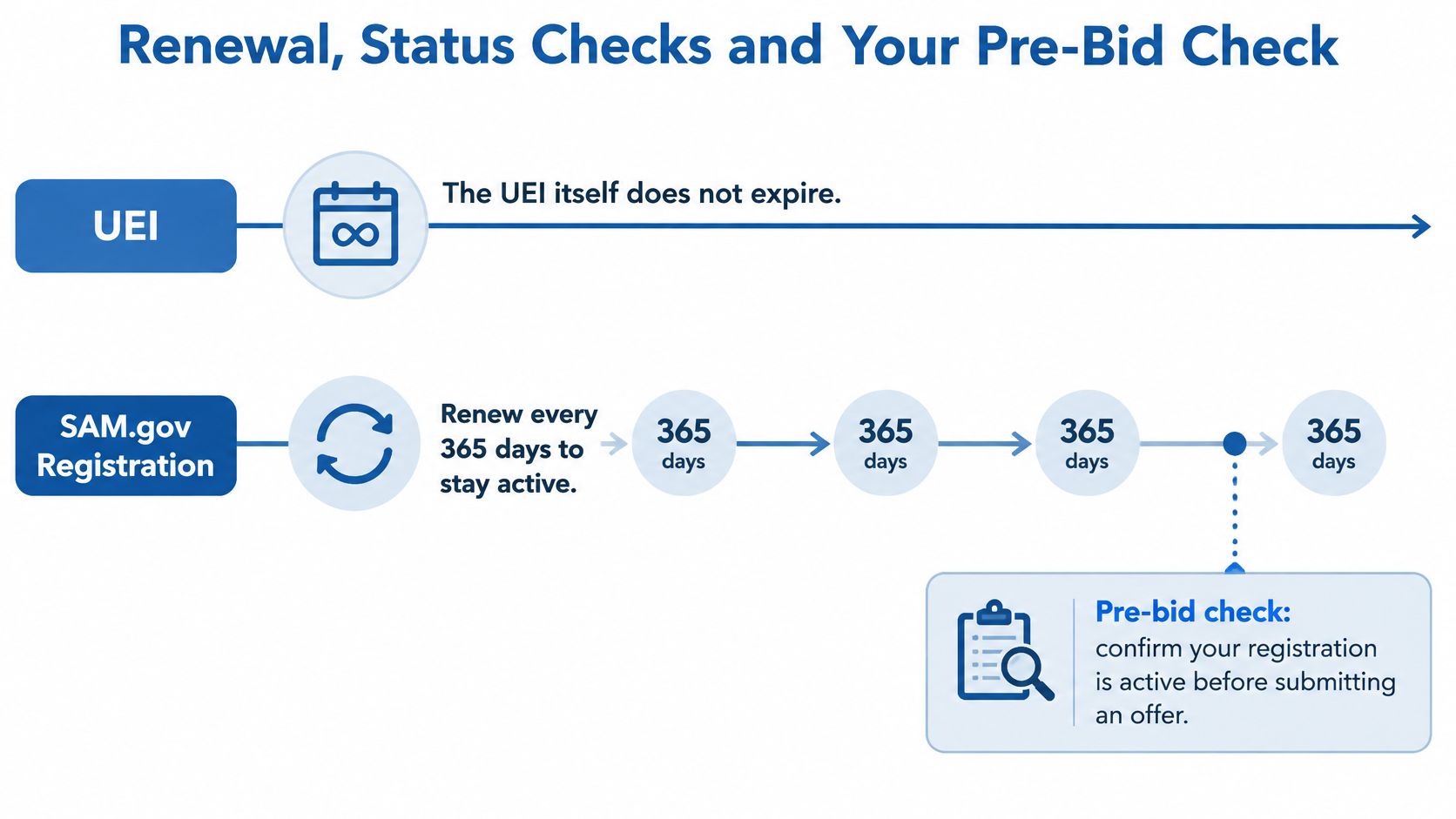
The status ladder below is the mental model worth keeping. Four stages often get collapsed into one, which is why a status check can say "active" while the submission failed.
| Status | What it means | What to check |
|---|---|---|
| UEI assigned | Entity identifier issued | Confirm legal name and address match official records |
| Entity validated | Government confirmed the entity is real and unique | Keep name and address current after any change |
| Registration active | Eligible to pursue direct federal work | Check the 365-day renewal date |
| Active through transaction date | Registration valid when the offer, award or contract needs it | Compare expiration against solicitation and award dates |
What disrupts eligibility between renewals
The clock isn't the only risk. Entity data changes can pull a registration out of active status because validation re-checks the name and address against authoritative records. A new legal name after a rebrand, a move to a different physical address, or a change in ownership all need to be reflected in SAM.gov promptly, not saved for the next annual renewal.
A smaller, quieter version of the same problem: a mailing address updated on the website but not in the government record. The registration still shows the old suite, the validation still passes against the old data, and the mismatch surfaces at the worst time.
There's also an asymmetry that catches analysts. A historical award can display a valid UEI while the company's current registration is inactive, pending or expired. The award record is accurate. It's describing a past state.
Analyst's habit: when you see a UEI in an older award, treat the identifier as durable and the registration as a snapshot with a date on it.
Your pre-bid checklist
Four checks, done in this order, take about ten minutes and prevent most submission failures. If you'd rather work from a written sequence than from memory, the eligibility checklist lays out the same checks step by step.
- Pull the UEI from SAM.gov, not from an old capability statement or a saved proposal file.
- Compare the legal name and physical address against your formation documents and your latest filing.
- Confirm registration is active through the due date and, if award looks likely, through the anticipated period of performance.
- Put the expiration date into your calendar and your pipeline records, with a reminder set well before it lapses rather than on the day.
For teams running several pursuits at once, automation helps. FederalPipeline provides match scores, eligibility checks and email alerts when new opportunities match a company, which keeps registration status in view instead of buried in a folder.
The single action to take today is small: look up your own UEI in SAM.gov, and confirm the legal name and address there match the records you'd put in front of a contracting officer.
FederalPipeline connects opportunities, budgets, buyers and awards in one place, so your team can see what's coming, whether you can bid, and who you're up against, with each company profile displaying its UEI alongside federal award and contract history. If you're qualifying opportunities and need to know which ones your registration status supports, start a search on FederalPipeline and check the eligibility picture before you commit bid time.